
2351 N. Alvernon Way, Suite G10, Tucson AZ 85712
520-425-8730 (Mon - Fri: 9:00AM - 6:00PM, Sat: 12:00PM - 3:00PM)
Click for the BBB Business Review of this Computers - Service & Repair in Tucson AZ

Tucson Computer Repair

Tucson Computer Repair Service


Apple iPhone Repair

Apple iPhone RepairFast, Affordable, Apple iPhone Repair - Same Day Service!!! - Click here for more information. We also do Apple iPod and Apple iPad Repairs.
Free LCD Screen Cleaning Kit 
With any laptop LCD Screen Replacement. (While supplies last).
Email Newsletter icon, E-mail Newsletter icon, Email List icon, E-mail List icon Sign up for our Email Newsletter
For Email Marketing you can trust
Need Help Now?
In many cases we can fix your computer issue remotely, using our state-of-the-art remote repair service.
It's fast,secure, & easy. Click here to learn more.


Tucson Computer Repair

Tucson Computer Repair

Computer Repair, Tucson, AZ--Fast, Affordable Service

We’d like to thank our customers for making Tucson Computer Repair Service one of the best reviewed computer repair companies in Tucson. We strive to improve our customer service on a daily basis. Customer satisfaction really is our #1 priority!

  • Do you have a pesky computer virus? We’ll not only remove the viruses from your computer, we’ll make sure your computer has the latest security updates to make it less likely that you’ll get re-infected in the future. We’ll also install free Anti-virus software if you need it.

  • Cracked or Broken laptop LCD Screen? We carry  the most common laptop LCD screens in stock. If we do have yours in stock, we can have it installed the same day you bring your computer in! Contact us first for a free estimate before you spend $$$ on a new computer. The cost of replacing your laptop LCD screen is typically much less than the cost of a new laptop. We can have your computer looking and working like new again.

  • Broken of defective laptop DC/Power Jack? Not many computer repair companies in Tucson do this type of repair anymore, but we do and have over a 95% success rate.

  • Windows XP, Vista, 7 problems? We can help!

  • Has your computer become slow and unresponsive? Due to a variety of software factors, after about 3 years or so most computers will start slowing down noticeably. A performance optimization or reinstallation of the Windows operating system can make a world of difference in terms of reviving your computer's lost performance, and at a fraction of the cost of purchasing a new computer. That old(ish) computer of yours may still have a lot of life in it yet. 

Latest News:


FBI Virus"FBI / Justice Department" Computer Virus Still Wide-spread:

Are you getting a scary warning on your computer from what appears to be the FBI / Justice Department or Homeland Security telling you that you have been performing illegal activities on your computer? Many, many people have been for several months now and we at Tucson Computer Repair Service have been removing a lot of these virus infections. This warning is completely illegitimate and is the result of a virus, so do not pay the $$$ they're asking for. It's a SCAM. That being said, it can be very stubborn to remove, where your Anti-virus will probably not suffice alone to get rid of this malware. We've removed this virus from dozens of computers and have had a great success rate. So if your computer is infected with this or some other viral nasty, we'd be happy to take of this problem for you.

Windows 8 Windows 8, for the better or worse, is here! The two most common complaints we're hearing is the lack of the traditional Start button, which has been replaced by the Tile start screen, and the fact that there is no provision for making Windows 8 boot straight to a desktop. We can help with these issues. We can install a Start button and make Windows boot to a desktop for a more Windows 7-like experience.


Our technicians are local to Tucson, Certified, and Experienced. Call us today at 425-8730.

Tucson Computer Repair Service ReviewsGoogle Reviews


Some of the Services We Provide:

Tucson Computer Repair

  • Computer and Laptop Repair, Maintenance, & Troubleshooting
  • Computer Setup and Installation
  • Virus and Spyware Removal
  • Remote Assistance
  • Internet Security
  • Data Backup Solutions
  • And more . . .


Computer Repair Tucson

  • Cracked Laptop LCD Screen Replacements
  • Laptop DC Power Jack Repair
  • Windows XP, Vista, and 7 Repair, Troubleshooting, and Reinstalls
  • Spam and Virus Protection
  • Broken Laptop LCD Hinge, Bracket, and Other Hardware Repairs
  • Data Recovery Services
  • And more . . .


Tucson Laptop RepairComputer Repair in Tucson

Cracked or Broken Laptop LCD Screen? We can help!

 Laptop LCD screens are very fragile and it doesn’t take much to break them. Many people believe that if you crack the LCD screen on your laptop, the replacement LCD will be so expensive that you might as well buy a new laptop. But this is very rarely the case. At Tucson Computer Repair Service, our average LCD replacement costs between $185.00 and $200.00 including installation, sometimes even less, well below the cost of a new computer—and also well below the prices at the chain stores.

Call us and we’ll be happy to give you a free estimate.

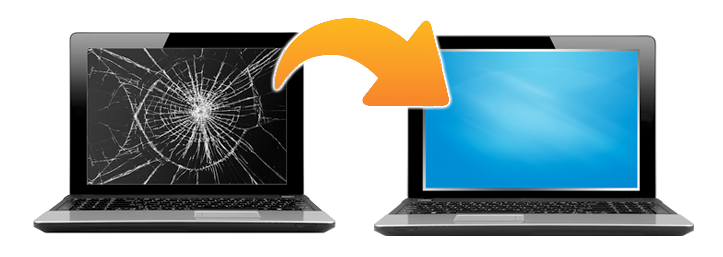
Before: cracked laptop LCD screens

Tucson Cracked & Broken Laptop LCD Screens

After: As good as new!

Repaired Laptop LCD Screens, Tucson, AZ

For other laptop computer repair services we provide in Tucson, click Read More.

Read more: Tucson Laptop Notebook Repair
 
Our Favorite Free Software

Below is out Favorite Free Software on the Internet. This isn't a comprehensive list but we will be adding more links in the future. This is some of the most useful and, best of all, free software we've found to date for your computer.

Antivirus Software:

Avast Antivirus Free Edition:

One of the best free antivirus applications on the net. While the free edition lacks some of the features of the paid version, it does offer automatic updates and real-time virus protection.

http://www.avast.com/en-us/free-antivirus-download

Malwarebytes Anti-Malware Free Edition:

This can be used in tandem with Avast or other antivirus programs without causing conflicts. The free version does not provide real-time virus protection or automatic updates. The paid version is well worth the $20-35 cost, depending on where you purchase it, to enable these features. A common set up we at Tucson Computer Repair service install on customer computers is the free version of Avast and the paid version of Malwarebytes. It’s a good combination.

http://www.malwarebytes.org/products/malwarebytes_free/

No-script:

Technically not an anti-virus program but a Firefox browser plug-in that can protect your computer from javascript-based viruses commonly spread through infected websites.

http://noscript.net/getit

Office Applications:

Kingsoft Office Suite Free Edition:

This suite provides a free equivalent to Microsoft’s Word, Excel, and Powerpoint, and has very good compatibility with the Microsoft Office applications. It is also light-weight, easy to install, and fast.

http://www.kingsoftstore.com/kingsoft-office-freeware.html

Libre Office:

I’m not personally very familiar with this software but have heard good things about it.  You can import files from Microsoft Word, Excel, and Powerpoint.

http://www.libreoffice.org/

System Utilities:

CCleaner:

We’ve been using this program for years. This program will clean out your Temp folders, history, cookies, basically the junk that accumulates on computers over time. It also has a registry cleaner.

http://www.piriform.com/ccleaner/download

DVD/CDR Burning Software:

ImgBurn:

A no-nonsense burner application that is great for creating or burning ISO files.

http://www.imgburn.com/index.php?act=download

Stay tuned for more great freebies!


Tucson Virus Spyware RemovalTucson Virus Removal: How Did My Computer Get Infected?

The vast majority of time viruses come from infected websites. These viruses exploit a security vulnerability in in your web browser, whether it’s Internet Explorer, Firefox, or another. The owner of the website from which your computer contracted the virus may or may not be aware that it contains malicious code. It’s been estimate that over 90% of the infected websites on the World Wide Web are legitimate, meaning that the people who own or manage the website are not aware that their website is infected and were not the ones who infected it in the first place. To give an example, a while back we had four different customers who came to us with infected computers who swore that the last website they visited was that of a major airline. This was too coincidental not to be true.

Your best protection against these threats is to be careful what websites you visit, what links you click on, and keep your antivirus software up to date. There are also various programs you can install to reduce these threats. See below for software links and more detailed recommendations.


Malwarebytes' Anti-Malware. My personal favorite. You can download it here.

Another excellent spyware scanner is SuperAntiSpyware. Download it here.

In addition there is Adaware, Spybot S&D, and Microsoft's Windows Defender.

Tucson Computer Repair Service does not warranty or endorse any of these products. These are merely recommendations of free antivirus solutions.

2. Keep Your Operating System and Web Browser Up-to-Date

This is vitally important. Microsoft regularly releases security updates for Windows operating systems, whether you're using Windows XP, Vista, or the new 7. Big collections of security updates and bug fixes are called "service packs." If you are running Windows XP, as of this date, you should also have Service Pack 3 installed. For Vista, Service Pack 2. For Windows 7, service pack 1.

Unless you have a good reason for not doing so, Automatic Updates should be turned on. You can visit Microsoft Updates at http://www.update.microsoft.com.

3. Consider Switching from Internet Explorer to Mozilla Firefox as your default web browser. Most people "in the know" believe Firefox is a more secure and better updated web browser, not quite as prone to exploits as IE. You can download Firefox here.

4. Do not open email attachments from people you do not know.

Opening up unknown email attachments is a great way to infect your computer with a virus.

5. Resist the temptation to install "free" Internet games, emoticons, desktop screensavers, and the like.

These so-called "free" programs often contain adware or worse and can result in your computer being plagued with pop-up advertisements amongst other very annoying things. In general, if you don't have a good reason to trust the source of the free game or program do not download it, install it, or agree to install it.

6. Stay away from suspicious websites.

Use your common sense in this respect.

7. Ideally, restrict access to your computer to the adults of the household.

Understand that if you let your precocious 13 year old play around on your computer, with free reign to the Internet, it is probably not going to be long before your computer is infected with all sorts of malware. Again, use your own best judgement on this. Your 13 year old may know more about computers than you do, but he doesn't have to pay for the computer repair technician ;)

8. Be cautious, not paranoid.

The Internet is full of scams, preditors, and malware, and deserves due cautiousness on your part, but if you follow some basic rules then you can dramatically reduce your exposure to them. And enjoy the Internet as it was meant to be enjoyed.